Collect
Connect PLCs, sensors and SQL databases through production-ready drivers and scheduled logging.
TwinCoreX is a cross-platform industrial visualization twin platform that turns PLC, sensor and SQL data into live graphical twin screens, dashboards, threshold values, analytics, reports and connected data services.
TwinCoreX follows the real engineering workflow of an industrial project. Build the data foundation first, create the visual model, then give operators and connected systems the views and data they need.
Create communication nodes for MQTT, Modbus TCP, Siemens S7 or Ethernet/IP. Enter the controller address, polling interval and tags, then watch node and scan status.
Configure reusable SQL data sources. Create datalog nodes, map driver tags to database columns and choose how often TwinCoreX records them.
Organize locations, plants, areas, systems and equipment in the asset hierarchy. Draw screens with shapes, pipelines, SVG graphics and navigation, then bind live tags to visual properties and animations.
Engineers configure in Edit mode; operators use Runtime mode to navigate the live process safely without changing the design.
Build independent dashboards from templates and widgets. Track threshold values, gauges, trends, Sankey flows, heatmaps and tables; zoom by time range and export chart data.
Configure reports once, run them for any date range and export CSV, Excel or PDF. Schedule processed values to external APIs and bridge data between databases.
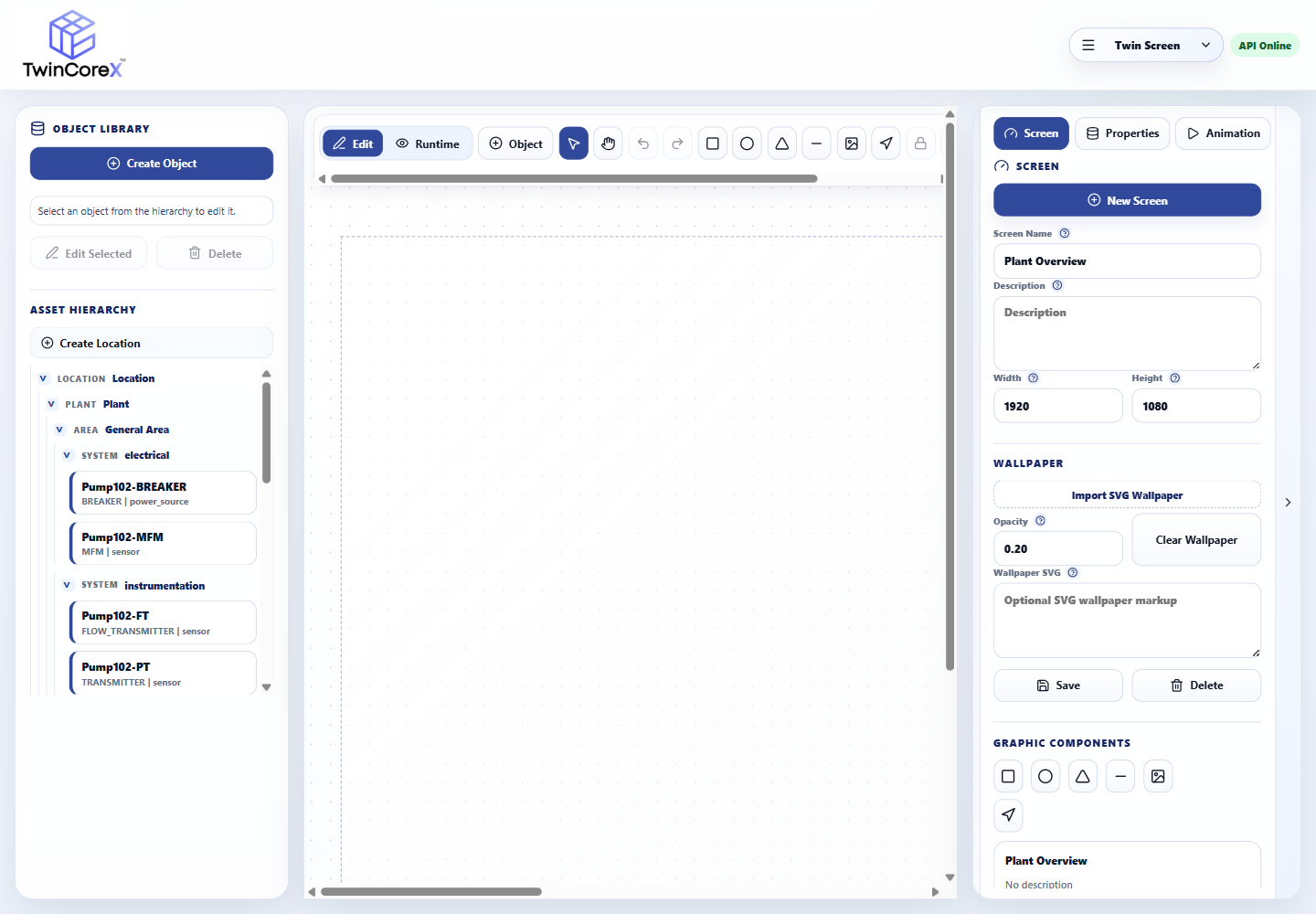
Create asset hierarchies and screens, place industrial graphics, bind live tags and configure animations before switching to operator Runtime.
Replace fragmented tools with a single operational layer built for the realities of modern industry.
Connect PLCs, sensors and SQL databases through production-ready drivers and scheduled logging.
Build a live digital twin and role-ready dashboards with trends, gauges, threshold status and asset context.
Find patterns with Sankey flows, heatmaps and reusable reports for any chosen date range.
Push governed, processed data to connected systems and APIs on a defined schedule.
Select a TwinCoreX module, change its live settings and experience how an industrial project is configured. This guided sandbox runs entirely in your browser and does not save any data.
192.168.1.20:502
Change the fields, then test the node. This mirrors the Communication editor workflow without contacting real equipment.
Any operation that runs on sensors, PLCs and SQL data can be modeled, monitored and improved in TwinCoreX.
Monitor pumps, flow, tank levels and pressure across treatment and distribution networks—with live threshold values and complete historical context.
Collection, monitoring, analytics and publishing live together—without the integration glue.
Poll, log and visualize on configurable intervals so decisions reflect current plant conditions.
Connect MQTT, Modbus, Siemens S7 and Ethernet/IP equipment out of the box.
Keep operational history in your SQL databases with backup, restore and one-way sync you govern.
Start with the capacity and capabilities your deployment needs, then extend the licence with available add-ons or upgrades. TwinCoreX supports Windows and Linux deployments as applicable to the selected edition.
A compact industrial runtime with reporting and one included communication connection.
A practical reporting and dashboard foundation for systems that do not need included device connectivity.
Enhanced reporting and dashboards with resilient data collection and analytical charting.
Plant-level monitoring, reporting and outbound integration with optional TwinScreen and analytics capabilities.
The complete engineering, visualization, analytics and integration platform for demanding industrial applications.
Your TwinCoreX licence is perpetual, so the licensed version continues to operate without an annual renewal. An optional feature-update subscription can be renewed year to year for access to eligible new features and product updates.
Scroll horizontally on smaller screens. Included capabilities are part of the edition; Add-on and Upgrade capabilities can be licensed separately. Planned capabilities are not yet available.
| Feature / Module | Soft RTU | Starter | Lite | Edge | Studio |
|---|---|---|---|---|---|
| Core | |||||
| Core runtime and configuration | Included | Included | Included | Included | Included |
| Data | |||||
| Datalogging | Add-on | Add-on | Included | Included | Included |
| Store-and-forward | Add-on | Add-on | Included | Included | Included |
| Deadband and compression historian | Add-on | Add-on | Add-on | Add-on | Included |
| MSSQL / MySQL / PostgreSQL support | Included | Included | Included | Included | Included |
| Outbound Database Bridge | Add-on | Add-on | Add-on | Add-on | Included |
| Connectivity | |||||
| C1: Single driver + single device | Included | Add-on | Included | Included | Included |
| C2: Single driver + unlimited devices | Add-on | Add-on | Add-on | Add-on | Included |
| C3: Unlimited drivers + unlimited devices | Add-on | Add-on | Add-on | Add-on | Included |
| HTTP/API driver (HTTP_API + HTTP_PUSH) | Add-on | Add-on | Add-on | Add-on | Included |
| DNP3 driver | Planned | Planned | Planned | Planned | Planned |
| Integration | |||||
| Data Publisher | Add-on | Add-on | Add-on | Included | Included |
| Public integration API | Add-on | Add-on | Add-on | Add-on | Included |
| Reporting | |||||
| Basic report builder / viewer | Included | Included | Included | Included | Included |
| Advanced report design and scheduling | Upgrade | Add-on | Included | Included | Included |
| Basic manual PDF / CSV export | Included | Included | Included | Included | Included |
| Custom PDF templates | Upgrade | Add-on | Included | Included | Included |
| Dashboard | |||||
| Dashboard | Upgrade | Included | Included | Included | Included |
| Advanced chart pack | Upgrade | Add-on | Included | Included | Included |
| Dashboard templates | Upgrade | Add-on | Included | Included | Included |
| Digital Twin | |||||
| TwinScreen | Upgrade | Upgrade | Upgrade | Add-on | Included |
| 3D assets and animation | Upgrade | Upgrade | Upgrade | Upgrade | Add-on |
| Analytics | |||||
| Asset health analytics | Upgrade | Upgrade | Upgrade | Add-on | Included |
| Basic predictive analysis | Upgrade | Upgrade | Upgrade | Add-on | Included |
| TimesFM forecasting | Upgrade | Upgrade | Upgrade | Upgrade | Add-on |
| Renewable / weather forecasting | Upgrade | Upgrade | Upgrade | Upgrade | Add-on |
| Operations | |||||
| Alarm and event server | Add-on | Add-on | Add-on | Add-on | Included |
| Security | |||||
| Basic user management | Included | Included | Included | Included | Included |
| Full user management and RBAC | Upgrade | Included | Included | Included | Included |
| Entra System Administrator Login | Upgrade | Add-on | Add-on | Add-on | Included |
| Basic security audit logs | Included | Included | Included | Included | Included |
| Extended audit export and retention | Add-on | Add-on | Add-on | Add-on | Included |
| Enterprise | |||||
| High availability/failover | Planned | Planned | Planned | Planned | Planned |
This matrix describes commercial edition scope. Add-on and upgrade availability is confirmed for the applicable licensed release. Planned capabilities are not available for production use.
Explore the full platform overview or speak with our team about a deployment shaped around your operation.
Tell us what you need to connect, monitor or analyze. We’ll show you how TwinCoreX brings it together.